Do you want to switch the language?

Deactivation of Exchange Web Services

Exchange Web Services is being phased out: What organisations need to know now

Microsoft is discontinuing Exchange Web Services (EWS) in Exchange Online. Organisations running applications, integrations or automations based on EWS should review their dependencies in good time and plan any necessary adjustments.

For many years, EWS has been a key interface for accessing Exchange Online content. Many third-party products, migration tools, archiving and backup solutions, CRM or ERP integrations, as well as custom scripts, may use EWS. In future, modern interfaces such as the Microsoft Graph API and, for certain administrative scenarios, the Exchange Online Admin API should be used.

EWS dependencies should be identified, assessed and gradually reduced before October 2026 to ensure that no unexpected service disruptions occur when EWS is deactivated.

Why is EWS being phased out?

EWS was originally developed for older Exchange integration scenarios. By phasing it out, Microsoft aims to reduce the use of legacy interfaces and migrate applications to more modern, secure and cloud-ready APIs.

The strategic target architecture for many application scenarios is Microsoft Graph. This provides access to Microsoft 365 data and functions via modern REST-based interfaces, OAuth-based authentication and more granular authorisation models.

DateEvent / Significance
July 2018Microsoft announces that EWS will no longer receive new feature enhancements.
2023Microsoft announces the planned decommissioning of EWS in Exchange Online.
January 2024Security incidents such as Midnight Blizzard underscore the focus on modern and secure access models.
2025Microsoft releases or enhances tools such as EWS Usage Reports, EWS Code Analyzer, EWS Usage Reporting Tool and other migration aids.
Early 2026Advanced control options are announced, including AppID Allow Lists and Baseline Security Mode.
June 206According to Office 365 / Microsoft 365 for IT Pros, EWS access for Frontline and Kiosk SKUs will be subject to stricter restrictions.
October 2026Microsoft begins the global, phased deactivation of EWS in Exchange Online.
April 2027According to the Microsoft timeline, EWS is due to be fully deactivated.
We bring about positive change

Which applications might be affected?

Applications and technical integrations with EWS dependencies

This primarily affects applications and technical integrations that still use EWS. Typical examples include:

  • Backup and archiving solutions
  • Migration tools
  • CRM and ERP integrations
  • Signature and workflow solutions
  • Mobile or industry-specific applications
  • Custom scripts, automations and legacy applications
  • Hybrid or near-coexistence scenarios, provided these still contain EWS dependencies

How can you tell if EWS is being used?

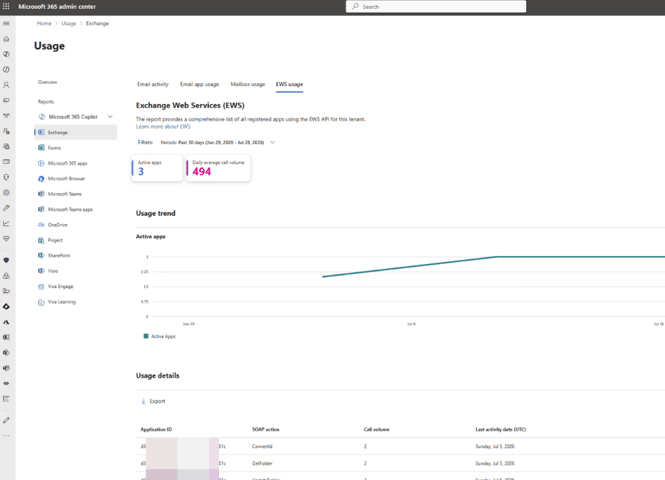
The central starting point is the Exchange Web Services Usage Report in the Microsoft 365 Admin Centre. The report shows which applications use EWS SOAP Actions and the volume of calls made to them.

Navigation in the Microsoft 365 Admin Centre: Reports → Usage → Exchange → EWS Usage

The report assists customers in particular with the following tasks:

  • Identifying active applications that use EWS
  • Analysing the Application IDs from Microsoft Entra ID
  • Mapping the SOAP actions used
  • Assessing the call volume and recent activity
  • Exporting the report data as a CSV file for further analysis
EWS

Recommended steps for customers

  1. Review the EWS Usage Report in the Microsoft 365 Admin Centre.
  2. Check application IDs and identify whether they are Microsoft, third-party or in-house developments.
  3. Check with vendors to see if a version without EWS dependency is available.
  4. Check your own applications for EWS Managed API, ExchangeService, SOAP calls, Autodiscover and application impersonation.
  5. Plan a migration path – typically to Microsoft Graph; for certain administrative scenarios, to the Exchange Online Admin API where necessary.
  6. Test changes in a controlled manner before blocking production dependencies.
GettyImages-1442272025

CANCOM M365 Pro-Active Services

Identify relevant Microsoft 365 changes at an early stage with CANCOM

Microsoft 365 is constantly evolving. New features, technical changes, potential risks and end-of-life announcements are an integral part of modern cloud environments. CANCOM’s M365 Pro-Active Services help Microsoft 365 administrators identify relevant developments at an early stage, assess their impact and optimally prepare their own environment for them.

In the context of the EWS decommissioning, this means that CANCOM assists customers not merely with an isolated readiness assessment, but as part of its general Microsoft 365 operational and configuration support.

The aim is to highlight relevant changes at an early stage, jointly assess configurations and provide expert guidance on any necessary adjustments.

Stay one step ahead of changes to Microsoft 365. With CANCOM M365 Pro-Active Services, you receive regular updates, structured reports and practical recommendations for action regarding relevant changes in your Microsoft 365 environment – from release changes and security insights to tenant configuration.

Service modules under CANCOM M365 Pro-Active Services

ModuleBenefits in the context of EWS / M365 operations
Release RadarRelevant new features and upcoming changes are professionally filtered and prepared for IT practice.
Regular GAP analysisConfiguration deviations are identified based on proven CANCOM best practices.
Security InsightsInformation on identity risks and security-related incidents within the customer’s tenant.
Adoption InsightsAnalyses of the usage of Microsoft 365 services, MFA and self-service password reset status.
Service Availability Summary of relevant disruptions and outages within the Microsoft 365 cloud services.
Tenant Health Review / M365 Tenant AssessmentAnnual expert review of Microsoft 365 data and critical settings, including personalised advice.

You might also be interested in:

Discontinuation of Microsoft SMS & Voice Authentication

Read more

Microsoft Secure Boot certificates

Read more

Contact
CANCOM Austria

CANCOM Austria AG processes your personal data exclusively in the context of your inquiry. Processing is carried out in accordance with Art. 6(1)(b) GDPR for the performance of a contract or a request. For storage and hosting, we use IT service providers who may access your data in the process. Providing your data is voluntary; however, without it, your inquiry cannot be processed. For questions, you can reach us at info@cancom.com.

Under this link you will find our privacy policy with further information.
How may I help you?
CANCOM Austria AG processes your personal data exclusively in the context of your inquiry. Processing is carried out in accordance with Art. 6(1)(b) GDPR for the performance of a contract or a request. For storage and hosting, we use IT service providers who may access your data in the process. Providing your data is voluntary; however, without it, your inquiry cannot be processed. For questions, you can reach us at info@cancom.com.

Under this link you will find our privacy policy with further information.