Do you want to switch the language?

CANCOM SignToGo

Digital signatures for efficient business processes
Request nowRequest now

The digital signature platform for modern companies

CANCOM SignToGo is a cloud-based application for digital signatures that has been specially developed to meet the requirements of business and corporate customers. Whether contracts, approvals or internal documents - with SignToGo you can sign digitally, avoid media disruptions and accelerate your workflows sustainably.

The solution is ready to use, flexibly scalable and can be customised to your needs - from simple signatures to qualified electronic signatures (QES).
Functions and advantages

Legally compliantdigital signatures

CANCOM SignToGo supports all relevant signature types according to the eIDAS regulation:

  • Simple electronic signature
  • Advanced electronic signature
  • Qualified electronic signature (QES)

This ensures that every digital signature corresponds exactly to the legal format required by your business - with maximum quality and security.

User-friendliness and flexibility

The platform is consistently focussed on the user:

  • Signing on desktop, tablet or smartphone
  • No additional software required
  • Clear, guided step-by-step process

Documents are ready to be signed with just a few clicks - no training required.

Seamless integration into existing systems - OPTIONAL

CANCOM SignToGo can be integrated into existing IT systems, document management and ERP solutions. This allows existing workflows to be further utilised and improved in a targeted manner.

Time and cost savings

Digital signatures replace manual processes:

  • shorter processing times
  • less administrative effort
  • lower printing, dispatch and archiving costs

Companies benefit from a measurable increase in efficiency in their day-to-day business.

Security and data protection

CANCOM SignToGo is operated in the CANCOM data centre in Austria:

  • ISO-certified infrastructure (including ISO 27001)
  • DSGVO-compliant data processing
  • Encryption and secure authentication procedures

Documents and signatures are reliably protected.

Clear processes for every user

A clear process is crucial for acceptance by every user.
The application guides you through the process step by step:

  1. Select document
  2. Define signature fields
  3. Specify signatory
  4. Sign document

This step-by-step approach saves time, reduces queries and ensures high quality in the process.

Quality and safety as the basis

A digital signature must not only work, it must also be legally and technically convincing. CANCOM SignToGo stands for:

  • high technical quality
  • secure processing of sensitive data
  • reliable operation

This makes the electronic signature a trustworthy component of your processes.

Typical areas of application

CANCOM SignToGo is suitable for numerous use cases, including

  • Contract management
    Employment contracts, purchase contracts, non-disclosure agreements
  • Finance and insurance
    Loan agreements, policies, consents
  • Public sector and healthcare
    Authorisations, patient information
  • Internal processes
    Approvals, orders, guidelines

Wherever signatures are required, digital signatures offer a secure alternative to paper.

4

Our offer

your CANCOM Austria SignToGo contains

own client in the CANCOM data centre
Setup and configuration of the signature workflows
cANCOM SMS & Mail Gateway
CANCOM signature certificate
Adaptation to your own CI/CD (logo & colour scheme)Optional
Connection to your SMS/email serverOptional
Own domain integrationOptional
Integration into your systemsOptional

Service that makes the difference

In addition to technology, service plays a decisive role. CANCOM accompanies you

  • with the introduction
  • during customisation
  • during operation

Our aim is to provide the best customer service - reliable, accessible and solution-orientated.

we transform for the better

Test signtogo for your use case as part of a proof of concept

  • Detailed overview of the signature processes. All active and completed signature requests can be seen on the user interface. Users can also view the status of the respective documents. Overview in which the signature process can be started.
    1
  • Function for uploading a document to initiate the signature process. Users can select a file and upload it to the system before the signature process is started.
    2
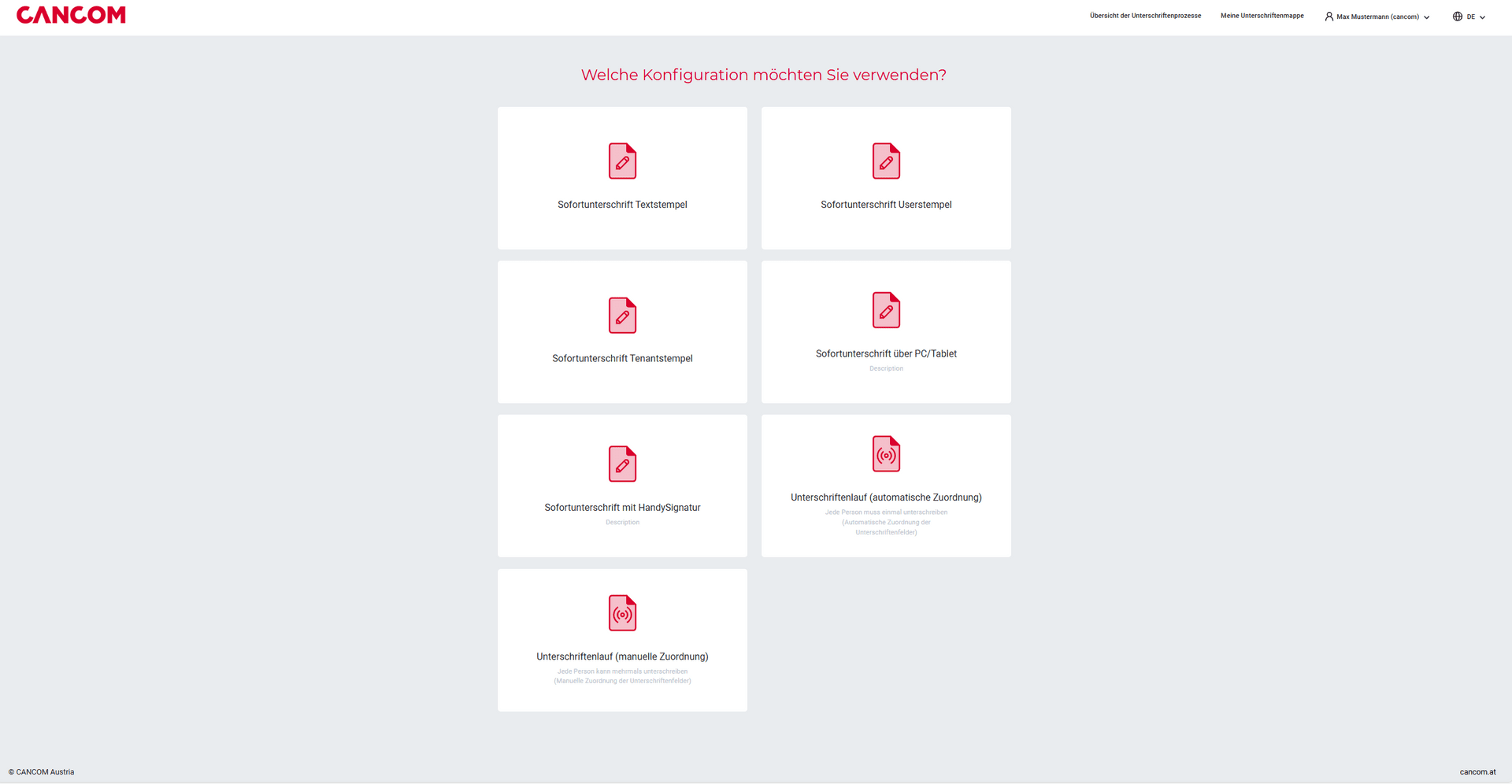
  • Available configuration options for the signature process. Users can select different configurations.
    4
  • Users can use A-trust for digital signatures to ensure security and authentication.
    5
  • Configuration of any signature process. Users can customize steps such as adding signatories and defining signature fields.
    6
  • Enter the personal data of the person signing and select the signature type and the device used. Users can enter their name, email and preferred method of digital signature (e.g. mobile device or PC).
    7
  • Filter option that allows users to filter signature processes according to criteria such as status, date or signatory.
    1
  • The first signatory can start the process. The link to the signature is sent by e-mail, while the access code for confirmation is received by SMS.
    12
  • Status of the signature process, including signatures in progress, completed or failed.
    8
  • The second signatory who has to sign the document can start the process after the first signatory has finished signing. The link to the signature is sent by e-mail, while the access code for confirmation is received by SMS. Example on a cell phone:
    Expert Forum 2025
  • Completion of the signature process, including confirmation and download option for the signed document.
    17 1

FAQs

Here you will find a collection of the most frequently asked questions about electronic signatures, CANCOM Austria SignToGo and similar topics:

  • What are the different types of electronic signature?
    • simple signature
    • advanced signature (AES)
    • qualified electronic signature (QES)

    As the "level" increases, so does the legal probative value of the respective signature type. At the same time, the necessary requirements also increase.

  • How is the electronic signature regulated by law?

    The legal framework conditions with regard to digital signatures are set out in the eIDAS Regulation and are standardized throughout the EU. Some important points of the eIDAS Regulation:

    • A qualified electronic signature has the same legal effect as a handwritten signature.
    • A qualified electronic signature based on a qualified certificate issued in one Member State is recognized as a qualified electronic signature in all other Member States.
  • Is there a difference between electronic and digital signatures?

    These two terms are often used as synonyms, but strictly speaking they refer to two different things. While the electronic signature is a legal term, the digital signature refers to the underlying technical or cryptographic process. In practice, a so-called Public Key Infrastructure (PKI) is used for this purpose.

    Both advanced and qualified electronic signatures are always technically based on a digital signature. This is not necessarily the case with a simple signature.

Contact
CANCOM Austria

Increase the efficiency of your company.

Our SignToGo experts will be happy to advise you on our customized offer without obligation.

Under this link you will find our privacy policy.
How may I help you?
Under this link you will find our privacy policy.